Don't Get Hooked: Opinionated Rules for Better React
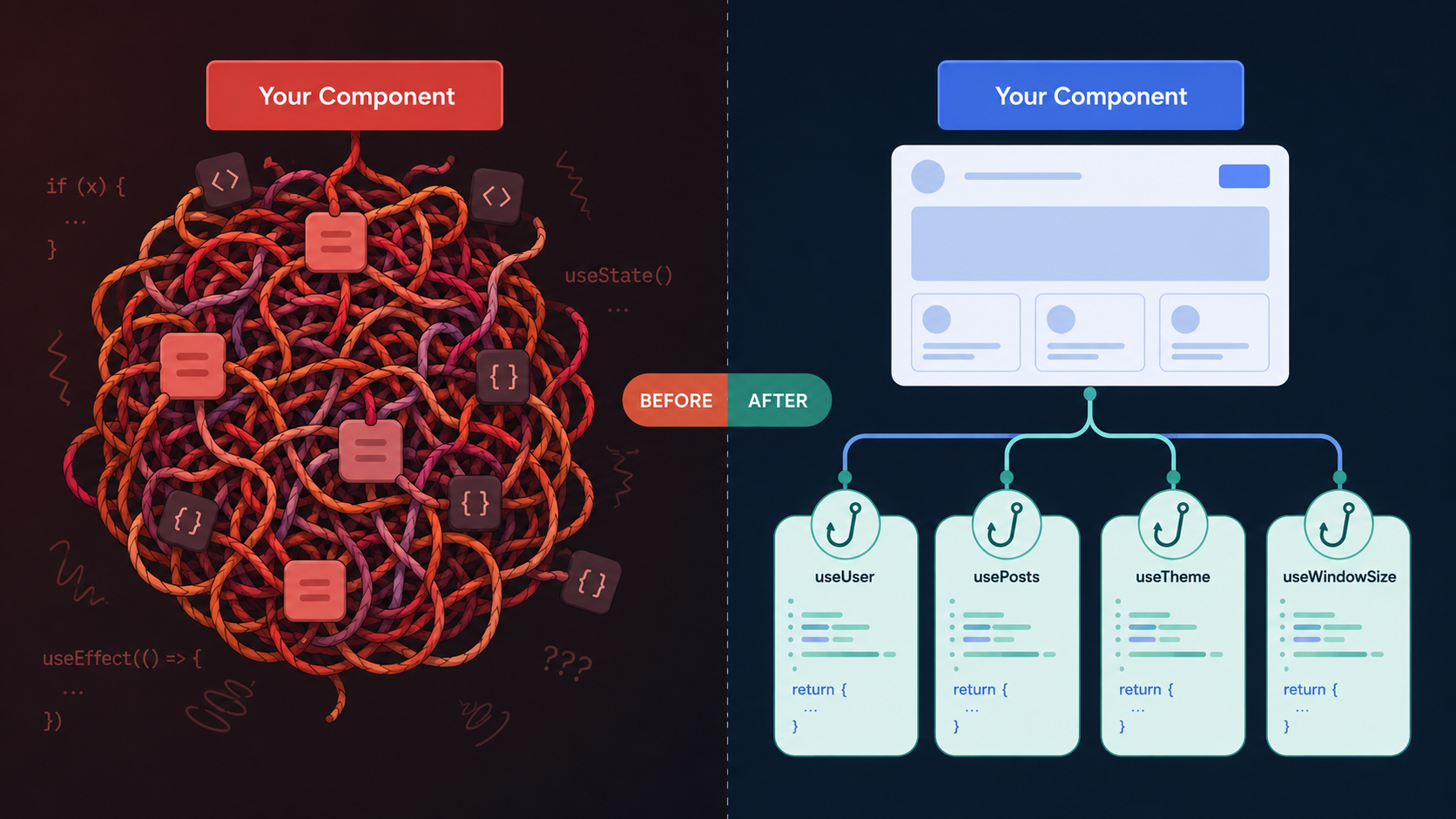
This post is going to be a very technical deep dive into React and how I think React code should be written. For context, I’ve been writing React since 2016. I used React before hooks existed, and I’ve worked on many React and React Native projects.
Buckle your seatbelt because there’s gonna be a lot of code in this one.
Intro
IMHO, React is basically the modern PHP.
If you talk to anyone who wrote PHP before Laravel, you’re going to find that the PHP language has a bad reputation. PHP makes it easy to embed business logic directly into HTML. Developers who cared about their sanity quickly realized this was a bad pattern, and then the various PHP frameworks and templating engines fulfilled the needs of the community. Despite the advancements made in PHP 7 and 8, PHP still has a bad reputation to this day.
Many React codebases do not separate logic from UI. The result is often a tangled mess of long components very similar to the PHP apps of old. When logic is tightly coupled to the UI, it is difficult to test core pieces of business logic. Nobody likes working in a tangled, bug-prone mess.
If you want to ship a React app without draining your sanity or losing sleep, keep reading.
Strong Opinions about Hooks
The first thing you must understand about React is that it is a view layer. The best part of React is JSX (the nice HTML-esque syntax) and the composability of components. State management and all the other stuff was basically an afterthought. Way back in the day, hooks didn’t exist. The React devs iterated on the state management bits of React to support a syntax that is arguably better than what existed before.
Before hooks existed, class components held state, and they had lifecycle methods like componentDidMount. These methods gave the developer very clear places to insert lifecycle logic and manage state. The render method contained all the JSX. While class components had many upsides, it was difficult to reuse stateful logic. The primary way of reusing logical code was to create a component that ONLY managed logic and handed off the UI to another component via renderProps. Here’s a link to the old React docs where this pattern was recommended.
Frankly, I hated the renderProp pattern. It was a really weird way of thinking. Also, if you had two renderProp components that you wanted to use, you either had to nest them in a weird way or use higher-order components – another confusing pattern.
The React team demoed the hook API and it took off.
Hooks made it easier to create reusable stateful logic in React. Hooks are functions, and they can be composed in ways that classes can’t. Because hooks can be called directly in components, there’s less separation between state management, UI, and other logic. Composability makes hooks very powerful tools, but hooks are also footguns.
To get the benefit of hooks while limiting the downsides, I have a few rules I like to follow.
Opinion #1: Limit hooks called in components
My first piece of advice is to implement a rule in your codebase to limit the number hooks that you can call directly in a component. Components tend to evolve over time. What starts off as a simple component often grows into a garbled mess:
function SignUpForm() {
    // We start with some basic fields
    const [email, setEmail] = useState('');
    const [password, setPassword] = useState('');

    // Oh, we decided to start collecting the user's phone number
    const [phone, setPhone] = useState('');

    // Oh yeah, we gotta validate that phone number and email to make sure they are legit
    // Gotta use some third-party service for it to prevent spammers
    // Gotta disable the continue button while we have invalid data and also track the errors for that
    const [validForm, setValidForm] = useState(false);
    const [errorText, setErrorText] = useState('');

    // time to make that API call
    useEffect(() => {
        // Gotta handle the edge case where the user navigates away mid-request so we
        // don't call setState on an unmounted component
        let cancelled = false;
        (async () => {
            try {
                await api.call();
                if (!cancelled) {
                    setValidForm(api.response.isValid);
                    setErrorText(api.response.isValid ? '' : api.response.error);
                }
            } catch {
                if (!cancelled) {
                    setValidForm(false);
                    setErrorText('Error validating email and phone');
                }
            }
        })();
        return () => cancelled = true;
    }, [phone]);

    return (
        <form>
            <input
                type="text"
                onChange={(e) => {
                    setEmail(e.target.value);
                }}
                name="email"
                value={email}
            />
            <input
                type="password"
                onChange={(e) => {
                    setPassword(e.target.value);
                }}
                name="password"
                value={password}
            />
            <input
                type="text"
                onChange={(e) => {
                    setPhone(e.target.value);
                }}
                name="phone"
                value={phone}
            />
            <input type="submit" disabled={!validForm} />
        </form>
    );
}
The code above collects email, password, and phone and calls out to an API to validate the phone number. By the time you add debouncing, analytics and metrics, error reporting, routing, styling, and all of the other stuff a real application has, you might have components that reach several hundred lines when all of the logic is shoved in. Large components quickly become unreadable, unmaintainable, and buggy.
Breaking the UI up into smaller components can help with readability, but the logic inside components is usually more problematic than large JSX blocks. Most developers are used to reading large blocks of HTML, but long functions have been considered an anti-pattern in basically all programs. In spite of this wisdom, many React codebases are full of large functions that often require lots of scrolling.
If you find that your components are full of logic, you should consider implementing a rule in your codebase to limit the number of hooks you can call directly in a component. Here’s a quick refactor:
function useUserData() {
    const [userData, setUserData] = useState({
        email: '',
        password: '',
        phone: '',
    });
    const [formState, setFormState] = useState({
        isValid: false,
        errorText: '',
    });

    useEffect(() => {
        let cancelled = false;
        (async () => {
            try {
                await api.call();
                if (!cancelled) {
                    setFormState({
                        isValid: api.response.isValid,
                        errorText: api.response.isValid ? '' : api.response.error
                    });
                }
            } catch {
                if (!cancelled) {
                    setFormState({
                        isValid: false,
                        errorText: 'Error validating email and phone',
                    });
                }
            }
        })();
        return () => cancelled = true;
    }, [userData.phone]);

    return {
        userData,
        setUserData,
        formState,
    };
}

function SignUpForm() {
    const {
        userData,
        setUserData,
        formState,
    } = useUserData();

    return (
        <form>
            <input
                type="text"
                onChange={(e) => {
                    setUserData((current) => ({
                        ...current,
                        email: e.target.value
                    }));
                }}
                name="email"
                value={userData.email}
            />
            <input
                type="password"
                onChange={(e) => {
                    setUserData((current) => ({
                        ...current,
                        password: e.target.value
                    }));
                }}
                name="password"
                value={userData.password}
            />
            <input
                type="text"
                onChange={(e) => {
                    setUserData((current) => ({
                        ...current,
                        phone: e.target.value
                    }));
                }}
                name="phone"
                value={userData.phone}
            />
            <input type="submit" disabled={!formState.isValid} />
        </form>
    );
}
I find the code above to be a massive improvement over the first implementation. The hook abstracts all of the data and the way it can change away from the UI layer. I also prefer related data to be grouped. Grouping user data like email, password, and phone together can make it clear to the reader that it’s a logical grouping rather than a bunch of disparate fields across many useState calls. The same can be said for the form state that tracks the validity of the form and any errors.
While this code is just an example, I think it demonstrates that components tend to grow over time. Limiting the number of hooks you call directly in your components will force a refactor. I would recommend picking a number that is reasonable for your codebase (maybe ~5 hooks to start or so). Every hook you add increases cognitive load. If you have to scroll through multiple pages of logic in a component, you’ve got way too much going on and you need to refactor.
Opinion #2: Do not put useEffect directly inside your components
Of all the hooks in React, useEffect is a pretty special one and deserves special treatment. My mental model for useEffect is basically to call it “useSideEffect”. useEffect is used to trigger side effects, and React defines side effects as any functionality that is not directly related to rendering UI. Common side effects include making API calls, initializing libraries, and managing setTimeout/setInterval calls.
There is a lot of content about the dangers of useEffect in various articles. If you’re new to React, I highly recommend reading You Might Not Need an Effect before continuing. That article will help you avoid many common pitfalls around useEffect and state management.
My personal opinion is that I do not like useEffect directly inside a component. useEffect is most commonly used in these ways:
- To perform some kind of interaction with a ref
- To do something and then modify some state
In either case, I think this logic is better off abstracted and not to be left in components. When new code is added to a component, many developers will put their useState or useRef call at the top of the component and then scroll down to the JSX block at the end of the component. At some point, a useEffect is added, and it usually gets thrown in right above the return. What ends up happening over time is that the useEffect logic becomes separated from the ref or state that it manages. Here’s an example of what I mean:
function MyCoolComponent() {
    const [state, setState] = useState({
        isAnimating: false,
        hasStartedAnimating: false,
    });
    const myRef = useRef(null);

    // useEffect to trigger an animation on mount
    useEffect(() => {
        if (!state.hasStartedAnimating) {
            setState({
                isAnimating: true,
                hasStartedAnimating: true,
            });
        }
        const timeout = setTimeout(() => {
            setState((current) => ({
                ...current,
                isAnimating: false,
            }));
        }, 1000);

        return () => {
            clearTimeout(timeout);
        };
    }, []);

    // many ref objects are called to do something on mount
    useEffect(() => {
        const rects = myRef.current?.getClientRects();
        if (rects?.length > 0) {
            const { width, height } = rects[0];
            console.log(`Area: ${width * height}pixels`)
        }
    }, []);

    return (
        <div ref={myRef}  className={state.isAnimating ? 'animate' : null}></div>
    );
}
As you can see in the example above, the useEffect that invokes a method on the ref object is separated from the useRef by the useEffect that modifies state. In complicated components, the distance between the declaration of state and where its used can grow larger and make things harder to reason about. Separating concerns with custom hooks is the way to go:
const useAreaRef = () => {
    const myRef = useRef(null);

    useEffect(() => {
        const rects = myRef.current?.getClientRects();
        if (rects?.length > 0) {
            const { width, height } = rects[0];
            console.log(`Area: ${width * height}pixels`)
        }
    }, []);

    return myRef;
};

const useAnimationState = () => {
    const [state, setState] = useState({
        isAnimating: false,
        hasStartedAnimating: false,
    });

    // useEffect to trigger an animation on mount
    useEffect(() => {
        if (!state.hasStartedAnimating) {
            setState({
                isAnimating: true,
                hasStartedAnimating: true,
            });
        }
        const timeout = setTimeout(() => {
            setState((current) => ({
                ...current,
                isAnimating: false,
            }));
        }, 1000);

        return () => {
            clearTimeout(timeout);
        };
    }, []);

    return state;
};

function MyCoolComponent() {
    const myRef = useAreaRef();
    const animState = useAnimationState();

    return (
        <div ref={myRef} className={animState.isAnimating ? 'animate' : null}></div>
    );
}
By creating custom hooks, we have grouped related logic together. In addition to reducing cognitive load, this will also help with testing – each hook can be tested in isolation. Eventually, each feature in your application may have a hook or a context that encapsulates all of the data and the ways you can interact with that data.
Here’s a more realistic example of a hook with some complexity:
const useQuerySearchResults = () => {
    const [query, setQuery] = useState('');
    const debouncedQuery = useDebounce(query);
    const {
        searchResults,
        getSearchResults,
        loading,
        clearSearchResults,
    } = useSearch();

    const reset = () => {
        setQuery('');
        clearSearchResults();
    };

    /**
     * When the debounced query changes, we need to clear search results
     * and load new results
     */
    useEffect(() => {
        clearSearchResults();

        if (debouncedQuery.length > 0) {
            const cancel = getSearchResults(debouncedQuery);
            return cancel;
        }
    }, [debouncedQuery, getSearchResults, clearSearchResults]);

    return {
        query,
        setQuery,
        loading,
        searchResults,
        reset
    };
};
This imaginary hook might be used to power a search feature. useQuerySearchResults abstracts a lot of logic like debouncing the query string as the user types, fetching the results, and providing a mechanism for resetting search state. This would be a lot of logic to cram directly in a component or a page, and having this logic isolated in a hook allows it to be reused across many different components. Maybe you have two different search bars with different styling but they have the same logic:
/**
 * Small search bar shown on every page
 */
const CompactSearchBar = () => {
    const {
        query,
        setQuery,
        loading,
        searchResults,
    } = useQuerySearchResults();

    return (
        <CompactSearchContainer>
            <SearchInput
                value={query}
                onChange={(newValue) => setQuery(newValue)}
            />
            {loading && <LoadingSpinner />}
            {searchResults.length > 0 && <CompactSearchResults results={searchResults} />}
        </CompactSearchContainer>
    );
};

/**
 * Full-page search
 */
const ExpandedSearchBar = () => {
    const {
        query,
        setQuery,
        loading,
        searchResults,
        reset
    } = useQuerySearchResults();

    return (
        <ExpandedSearchContainer>
            <SearchInput
                value={query}
                onChange={(newValue) => setQuery(newValue)}
            />
            <Button onClick={reset}>Clear</Button>
            {loading && <LoadingSpinner />}
            {searchResults.length > 0 && <ExpandedSearchResults results={searchResults} />}
        </ExpandedSearchContainer>
    );
};
The above components are super easy to read, and you don’t have to understand all of the logic powering the search component unless you need to change it or debug it. The search logic can also be unit-tested independently from the UI. The components are also in a good state for adding functionality later down the line. Writing good hooks up front saves time spent refactoring cluttered code later.
Unit testing the hook is also trivial now. Here’s an example test case:
import { renderHook, act, waitFor } from '@testing-library/react';
import { useQuerySearchResults } from './useQuerySearchResults';

/**
 * In a real test, you'd probably mock out some API calls * with MSW
 */

describe('useQuerySearchResults', () => {
    it('clears query and results on reset', async () => {
        const { result } = renderHook(() => useQuerySearchResults());

        act(() => {
            result.current.setQuery('react hooks');
        });

        await waitFor(() => {
            expect(result.current.searchResults).not.toEqual([]);
        });

        act(() => {
            result.current.reset();
        });

        expect(result.current.query).toBe('');
        expect(result.current.searchResults).toEqual([]);
    });
});
Strong Opinions about Memoization
Memoization is a topic that deserves some discussion as I have found there to be some common misunderstandings. First of all, memoization is not a magic wand that always makes your code more efficient. If memoization automatically made code more efficient, it would be applied to all code by default. Memoization has overhead, and it must be applied carefully based on the needs of your application. Kent Dodds has a great article that is worth reading on this topic.
Opinion #3: Always take advantage of “free” memoization
Consider the following component:
function CoolComponent() {
    const myColors = {
        RED: "RED",
        GREEN: "GREEN",
        BLUE: "BLUE",
    };

    const logSomething = () => {
        console.log('woohoo');
    };

    return (
        <div>
            /* imagine something with colors and logging in here */
        </div>
    );
}
Because of how Javascript works, the myColors object and the logSomething function get new references on every render. New references destroy performance in React applications due to how React uses reference comparisons to determine if components should rerender. In this case, the myColors object is actually just a constant. Because of this, we can just move it outside the component. Also, the logSomething function is just a pure function with no dependencies on any state inside the component. We can move it out too so that its reference won’t change.
const myColors = {
    RED: "RED",
    GREEN: "GREEN",
    BLUE: "BLUE",
};

const logSomething = () => {
    console.log('woohoo');
};

function CoolComponent() {
    return (
        <div>
            /* imagine something with colors and logging in here */
        </div>
    );
}
Moving constants and util functions out of your component is basically free memoization. Take advantage of it every chance you can. In addition to the performance bonus, it also improves readability of your component code.
Opinion #4: Use useMemo and useCallback as little as possible
I have seen many React codebases resort to memoizing values and functions unnecessarily. This is not a good habit to adopt and it can actually harm your performance. In my experience, the most common case for useCallback is to optimize useEffect calls. I have frequently seen patterns like this:
const useMyCoolHook = ({ prop }) => {
    const [state, setState] = useState(1);

    const calculateStuff = useCallback(() => {
        return prop + state
    }, [prop, state]);

    useEffect(() => {
        // calculate and then do something with it
        const x = calculateStuff();
        // ... more code that uses the calculation
    }, [calculateStuff])
};
In some cases, the above code can be just fine if the calculateStuff function is used in multiple places; however, if you’ve created a memoized function that is only used in a useEffect, sometimes it can be better to just put that function or the logic inside the effect:
const useMyCoolHook = ({ prop }) => {
    const [state, setState] = useState(1);

    useEffect(() => {
        // calculate and then do something with it
        const calculatedStuff = prop + state;
        // ... more code that uses the calculation
    }, [prop, state])
};
Putting the logic inside the effect removes a memoization call and is a small performance improvement. In general, I would recommend only calling useCallback on functions that are going to be passed to a useEffect and also used elsewhere. Otherwise, declaring a new function is cheap and not worth memoizing.
useMemo should primarily be reserved for values that are expensive to compute. The most common case for useMemo is for operations that iterate over large arrays. Mapping over a few values on render will not hurt performance much, but iterating over an array with 10+ elements may be a performance issue.
Strong Opinions about State Management
State management is a debated topic in the React community. When I first started using React, the options for managing state were:
- Holding state in a component somewhere.
- Redux
- MobX
Eventually the community built new libraries. Hooks became a thing and now there’s a lot of options (Jotai, zustand, xstate-store, etc.). It might be tempting to reach for a library to manage your state, but I think many of these libraries are overkill for most projects.
Opinion #5: Use React’s built-in state hooks for as long as possible
My advice for 90% of projects is to use the vanilla React hooks to manage your state for as long as possible. useReducer and useState with some occasional memoization work very well. When data needs to be shared across pages or there are large rerenders caused by updates, then there is a strong case to reach for a library. Premature optimization and unnecessarily complex libraries will slow down your ability to ship.
In my mind, I think there are 3 main categories of state in a React app:
- Form state - state that is held within a form or inputs
- Data state - data that is sent or received from an API
- UI state - state that is used for things like animations
Form State
One problem that is unique to form state is that validation logic often happens client-side before data is sent to the backend. Large forms can be problematic in a React application from a performance perspective – especially if form validation is occurring on every keypress.
If forms are used frequently in your application, you may want to consider a form library instead of managing state yourself. Do your research and pick a library that works for you. Prototypes are pretty cheap with AI these days, so try multiple libraries and pick the best one.
Data state
Every serious app makes a ton of API calls. When your app gets really complex, you’ll employ client-side caching and also have to refetch stale data when it is modified. Good data fetching libraries exist, but it’s important to pick one that works well for your app and one that is also easy to test.
Unless you’re looking for a real challenge, I would use a library for data fetching rather than implementing my own solution. TanStack query is probably the best choice for a REST app, and Apollo works pretty well for GraphQL.
UI State
In general, most UI state can be held in vanilla React hooks, but there are times where libraries can be helpful. There are more general libraries like zustand and Jotai, but if your problem is a good match for a state machine, I would recommend a library like XState. I used XState with great success at a former employer to solve a difficult routing problem.
Conclusion
The five opinions in this post all point at the same underlying idea: separate your concerns. Logic belongs in hooks, and your components should be incredibly simple views that call those hooks. Simplicity is the goal; complexity ruins productivity in large codebases.
Follow these rules long enough and they’ll feel less like rules and more like a superpower. You’ll instinctively start reaching for custom hooks before a component gets noisy, and you won’t spend hours detangling logic from components. Your code will be easier to read and easier to test, which will make your productivity better with fewer bugs.